Fyrox Game Engine 1.0 Release Candidate 2
I'm happy to announce that Fyrox 1.0.0-rc.2 was released! Fyrox is a modern game engine written in Rust, it helps you to create 2D and 3D games with low effort using native editor; it is like Unity, but in Rust.
This is the second intermediate release intended for beta testing before releasing the stable 1.0. The list of changes in this release is quite large, it is mostly focused on bugfixes and quality-of-life improvements, but there's a new functionality as well. In general, this release stabilizes the API, addresses long-standing issues.
If you find a bug, confusing or incomplete documentation, please file an issue (opens new window) or propose a solution by creating a pull request (opens new window).
# Installation
Use the link (opens new window) to download page to learn how to install this release.
# Error Handling
Pretty much every method of a plugin or a script now returns the special type called GameResult which is a type alias
for Result<(), GameError>. This allows you to easily handle various errors that may occur during the code execution by
applying ? operator.
#[derive(Visit, Reflect, Default, Debug, Clone, TypeUuidProvider, ComponentProvider)]
#[type_uuid(id = "bf0f9804-56cb-4a2e-beba-93d75371a568")]
#[visit(optional)]
struct MyScript {
    rigid_body: Handle<RigidBody>,
    light: Handle<PointLight>,
}

impl ScriptTrait for MyScript {
    fn on_update(&mut self, context: &mut ScriptContext) -> GameResult {
        let graph = &context.scene.graph;
        let node = graph.try_get(context.handle)?;
        println!("{}", node.name());
        let rigid_body = graph.try_get(self.rigid_body)?;
        let light = graph.try_get(self.light)?;
        // Do something useful.
        Ok(())
    }
}
When an error occurs in any of the methods, the engine simply prints it to the log and continues execution as usual.
This is the key difference between errors and standard panic mechanism. Error handling via ? operator flattens the
code and makes the code less verbose and much easier to read.
The GameError type can hold errors of pretty much any kind, so any error that implements std::error::Error trait
can be returned.
# Backtrace capture
By default, all errors that may occur during the code execution don't capture the backtrace, which may significantly
complicate tracking of the original source of error. Backtrace capture can be enabled by using
enable_backtrace_capture method.
use fyrox::plugin::error::enable_backtrace_capture;

#[derive(Visit, Reflect, Debug)]
struct MyPlugin;

impl Plugin for MyPlugin {
    fn init(&mut self, scene_path: Option<&str>, context: PluginContext) -> GameResult {
        // This method can be called at any point in your game, this way you can enable or disable
        // enhanced error data collection when needed.
        enable_backtrace_capture(true);
        Ok(())
    }
}
This way the engine will print the error message alongside with the backtrace which points to the exact place where the error originates from.
# Error Handler
The engine now also allows you to handle all errors that may occur during script or plugin code execution. Each plugin
has the Plugin::on_game_error method for that:
#[derive(Visit, Clone, Reflect, Debug)]
struct MyGame;

// Define an error type for your game first.
#[derive(Debug)]
pub enum MyError {
    NoScene,
}
impl std::error::Error for MyError {}
impl Display for MyError {
    fn fmt(&self, f: &mut Formatter<'_>) -> std::fmt::Result {
        match self {
            MyError::NoScene => {
                write!(f, "The scene is not specified!")
            }
        }
    }
}

impl Plugin for MyGame {
    fn init(&mut self, scene_path: Option<&str>, context: PluginContext) -> GameResult {
        match scene_path {
            Some(scene_path) => {
                context.async_scene_loader.request(scene_path);
                Ok(())
            }
            // Spawn an error.
            None => Err(GameError::user(MyError::NoScene)),
        }
    }

    fn on_game_error(&mut self, context: &mut PluginContext, error: &GameError) -> bool {
        if let GameErrorKind::UserError(ref err) = error.kind {
            if let Some(my_error) = err.downcast_ref::<MyError>() {
                // Do something useful, for example show a warning message box.
                // ...

                // Mark the error as handled.
                return true;
            }
        }

        // The rest is unhandled.
        false
    }
}
This method must return either true or false. true means that the error was handled and no further actions from
the engine is needed. false means that the error is still unhandled, and it will be processed by the engine (usually
just printed to the log, but this may change in the future).
# DynType
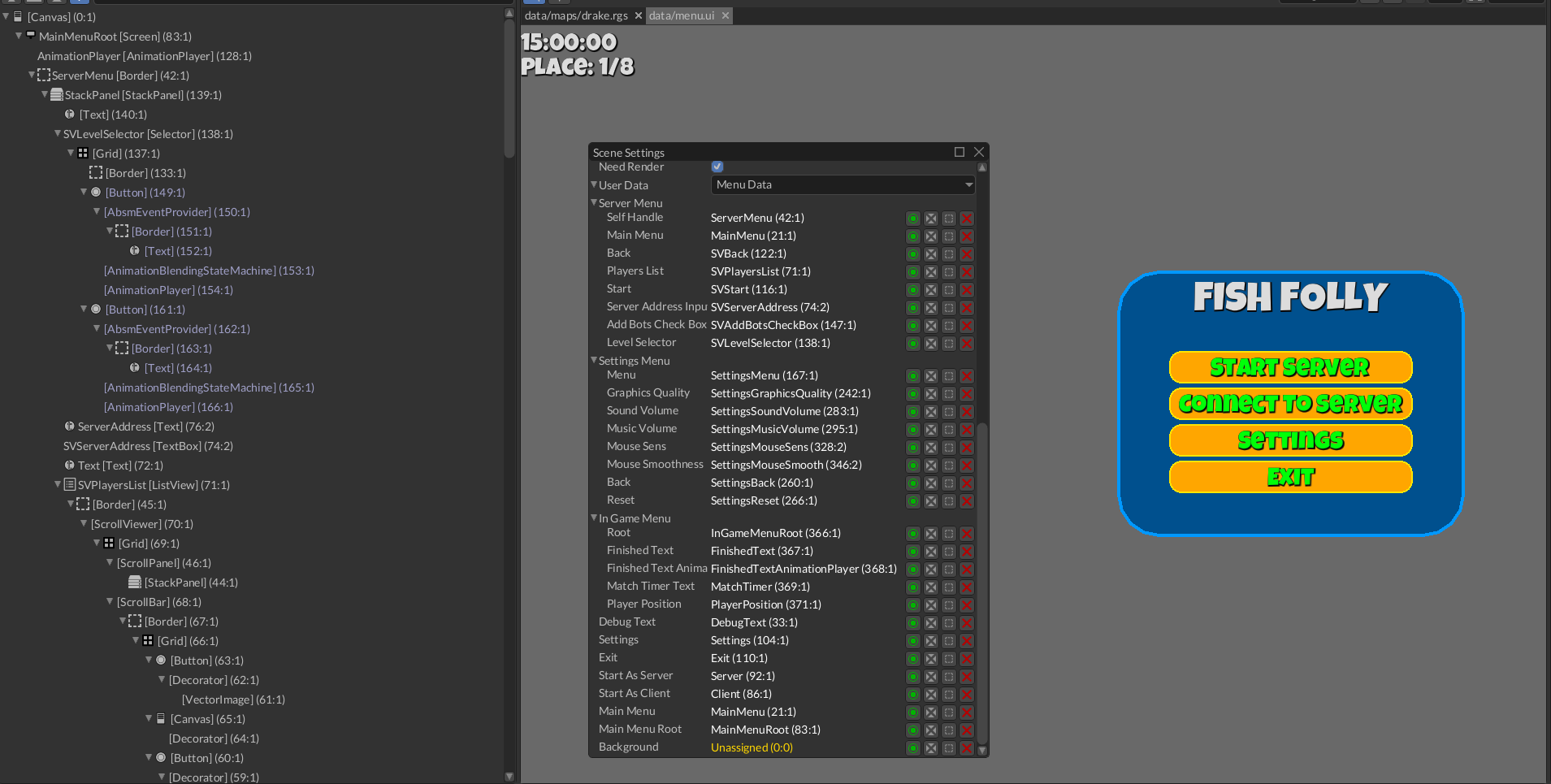
DynType is a user-defined serializable structure that can be attached to a game scene or a user interface.
Such structures can be used to store additional data with a scene. For example, this could be a set of handles to
widgets in a user interface or some configuration data. DynType is somewhat similar to user-defined resources,
but has one major difference: DynTypes can contain handles to the scene content, which will be managed by the engine
automatically. Typical example of a DynType is the game menu
in Fish Folly (opens new window):
#[derive(Visit, Reflect, Debug, Default, Clone, TypeUuidProvider)]
#[type_uuid(id = "7dc2d3b9-1990-464c-bab3-3b6973f930e9")]
pub struct ServerMenu {
    self_handle: Handle<UiNode>,
    main_menu: Handle<UiNode>,
    back: Handle<Button>,
    players_list: Handle<ListView>,
    start: Handle<Button>,
    server_address_input: Handle<TextBox>,
    add_bots_check_box: Handle<CheckBox>,
    level_selector: Handle<Selector>,
    #[reflect(hidden)]
    server_address: String,
    #[reflect(hidden)]
    available_levels: Vec<PathBuf>,
    #[reflect(hidden)]
    selected_level: Option<usize>,
    // ...
}

#[derive(Visit, Reflect, Default, Debug, Clone, TypeUuidProvider)]
#[type_uuid(id = "87b01b49-af2b-439a-a077-61700f817e3e")]
pub struct MenuData {
    debug_text: Handle<Text>,
    settings: Handle<Button>,
    exit: Handle<Button>,
    start_as_server: Handle<Button>,
    start_as_client: Handle<Button>,
    main_menu: Handle<UiNode>,
    main_menu_root: Handle<UiNode>,
    background: Handle<UiNode>,
    // ...
}
These structures contain handles to various elements of the UI and used directly by the game. Previously, there was a hacky way of storing custom data in a scene - by creating a special script and assigning it to a node. Now the management of "global" scene data is much easier and more reliable.
Each DynType must be registered in a special container before use, otherwise the engine won't allow you to create
an instance of such type. This must be done in Plugin::register method:
impl Plugin for Game {
    fn register(&self, context: PluginRegistrationContext) -> GameResult {
        context.dyn_type_constructors.add::<MenuData>("Menu Data");
        Ok(())
    }
}
Once the type is registered, it can be assigned to the User Data property in the scene settings (File ->
Current Scene Settings) like so:
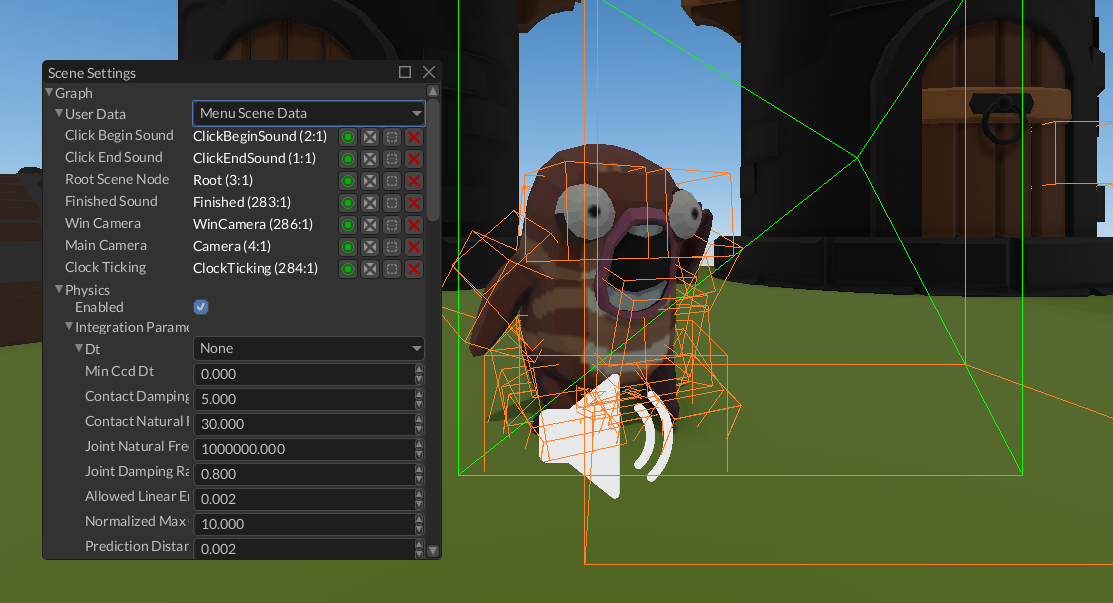
DynTypes can contain pretty much any data that supports Reflect (introspection) and Visit (serialization) traits.
The type must also provide a unique UUID which is used for serialization needs. This UUID must never change,
otherwise the engine won't be able to load such DynType.
# Surface Data
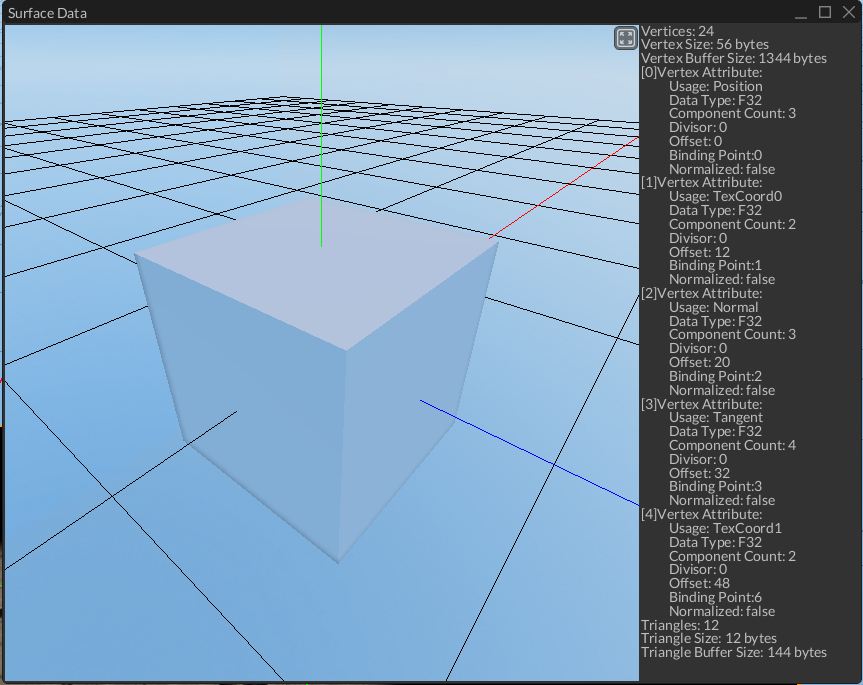
Surface data viewer is now able to show vertex layout, its size and overall space used by the surface data. This is useful for debugging; for cases when a vertex must have a very specific layout.
# Light Map Improvements
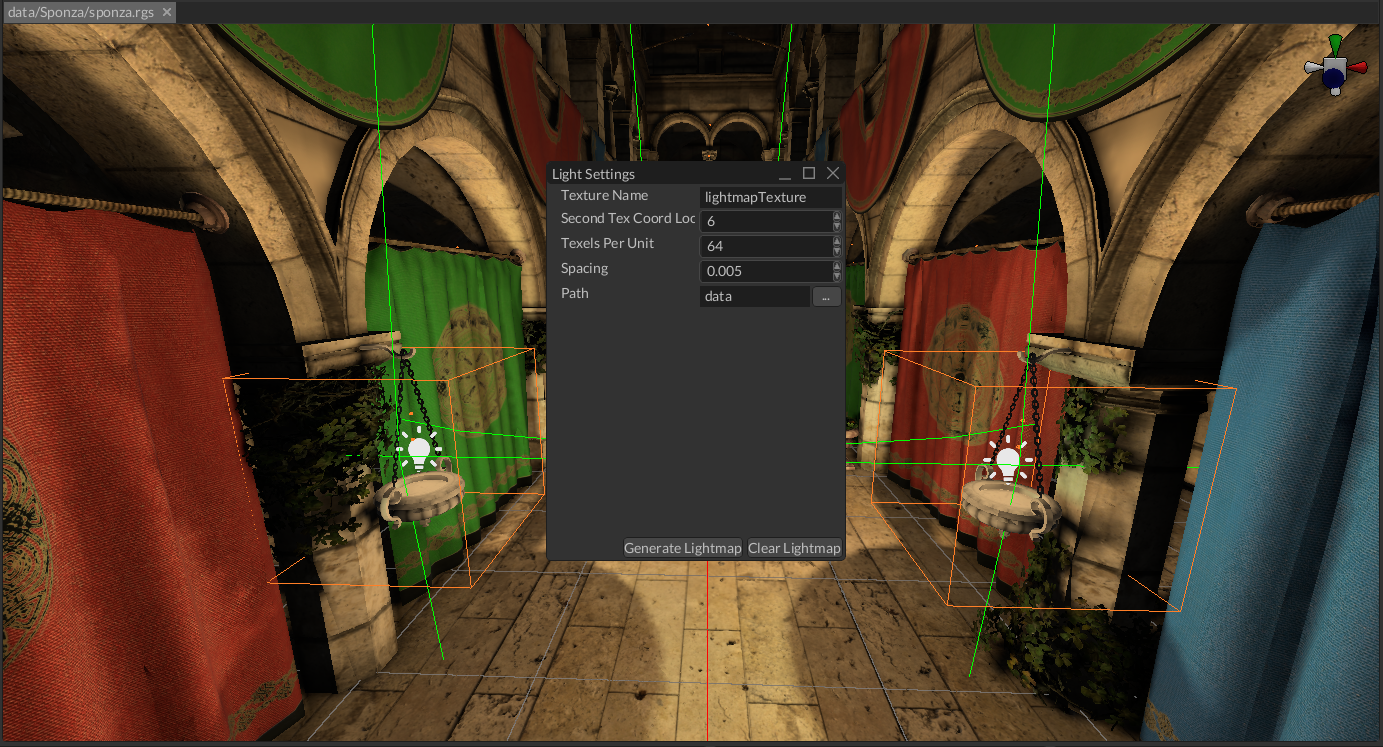
Light map is a texture that contains pre-computed light. Fyrox has built-in light map generation tool that was improved
in this release. Previously, the engine assumed that the second texture coordinates were always located at the sixth
binding point and that the texture slot for the map was called "lightmapTexture". Now these parameters are configurable.
Also, the previous implementation had a major bug that caused incorrect light mapping on surfaces with shared materials. Since the material was shared, but each surface has its own unique light map texture, only one texture was applied to all surfaces that shared the same material.
Light map tool now also reports all unsupported scene nodes and the reason why light cannot be "baked" for them. This prevents confusion and simplifies debugging.
# Type Safety
The previous release candidate version started transition to typed handles (opens new window) which is now finally finished. The engine now uses typed handles where possible, which addresses the very old issue with type erasure when placing objects in scenes or user interfaces.
# User Interface
This release contains a significant overhaul of the message system of UI. In the previous release, you had to use special helper methods to construct a message, now all such constructors are removed, and you can use enum variants directly. This simplifies the message creation and makes it less prone to errors since there's direct use of enum variant. For example, this is what you had to use before:
ui.send_message(WidgetMessage::background(
widget,
MessageDirection::ToWidget,
Brush::Solid(Color::Red)
));
This is the new approach:
ui.send(widget, WidgetMessage::Background(Brush::Solid(Color::Red)));
As you can see, it is less verbose and much more clear.
# Performance
This release contains a massive performance improvement for user interfaces. Widgets rendering is now optimized to
reuse as much of the existing drawing data as possible. This is done using visual invalidation flag. When a widget
changes its visual appearance, it raises a flag that forces the UI system to call Control::draw, but only once
until the next invalidation. This saves a ton of computing in case of complex user interfaces and gave almost 3x
performance boost for the editor (the editor is based on fyrox-ui).
# Automated Testing
Stable release of Fyrox 1.0.0
#[test]
fn test_close_with_save() {
    utils::run_editor_test(
        "Menu/File/CloseWithSave",
        TestPlugin::new(
            Macro::begin()
                .click_at(FileMenu::FILE)
                .click_at(FileMenu::NEW_SCENE)
                .then(|editor| assert_eq!(editor.scenes.len(), 1))
                .click_at(FileMenu::FILE)
                .click_at(FileMenu::CLOSE_SCENE)
                .click_at_text(SaveSceneConfirmationDialog::DIALOG_ID, "Yes")
                .click_at_text(FileMenu::SAVE_FILE_SELECTOR, "Save")
                .then(|editor| assert_eq!(editor.scenes.len(), 0)),
        ),
    );
}
This test framework added support of "headless" mode for the editor - this is a special mode, that does not create the main window and doesn't create the renderer. In other words, headless mode only runs editor logic. This mode is very useful for automated testing, since it allows to run multiple editor instances in the same process and test all of them is separate threads.
# Text
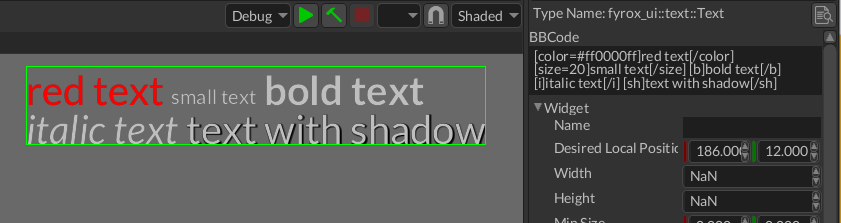
Fyrox now supports markup BBCode markup language for Text and TextBox widgets. This is a very simple approch that
allows you to stylize the text with little to no effort. The main use case for this markup is to create stylized text
that can be used for descriptions, where specific parts of the text need to be highlighted.
The available tags are:
[b]bold text[/b][i]italic text[/i][color=red]red text[/color](can be shortened to[c=red]...[/c], and can use hex color as in[color=#FF0000])[size=24]large text[/size](can be shortened to[s=24]...[/s])[shadow]shadowed text[/shadow](can be shortened to[sh]...[/sh]and can change shadow color with[shadow=blue])[br]for a line break.
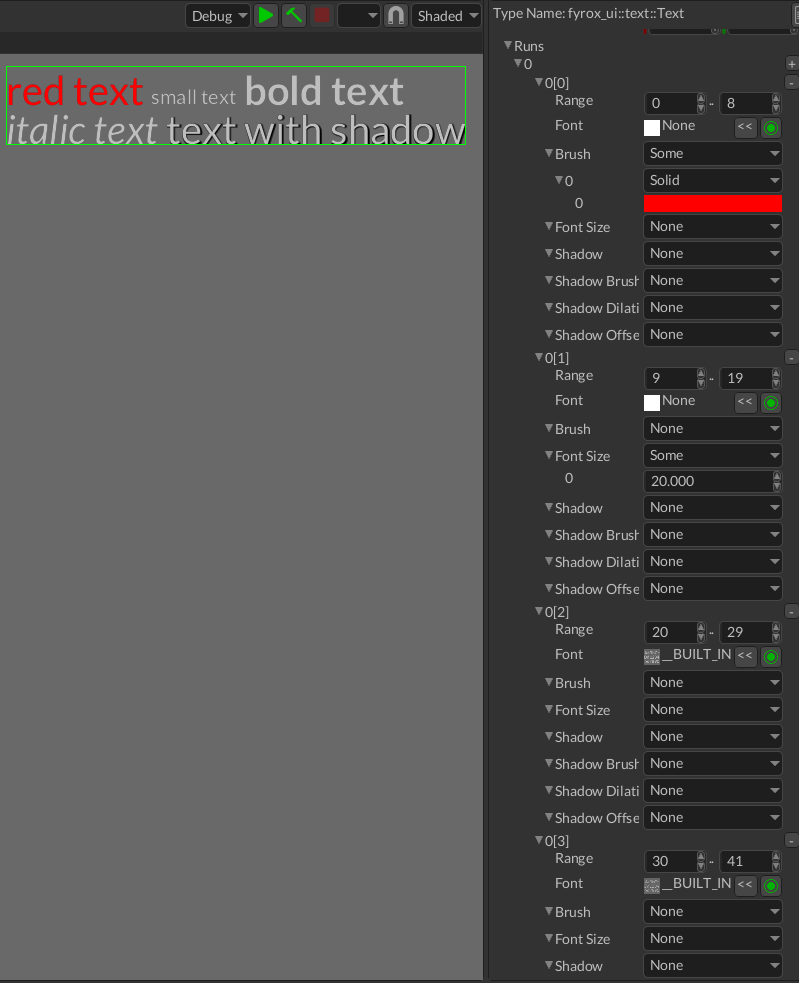
BBCode markup essentially creates a set of runs, that applies different styles to the specified portions of the text:
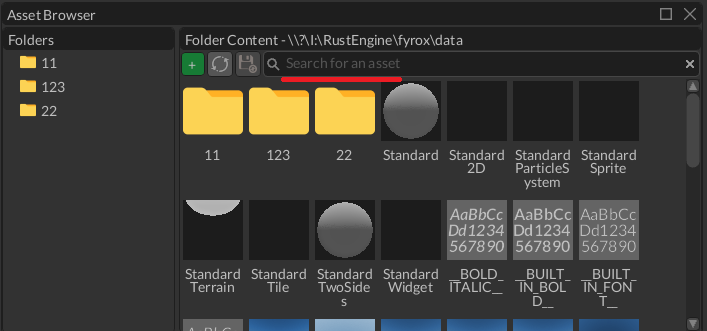
TextBox widget now have an ability to specify placeholder text. This text will be shown only if the text box is empty,
and it can be used to show hints or the purpose of the input field. For example, this is how the placeholder looks like
in the asset browser:
TextBox widget now also supports padding for the text. It essentially adds a configurable margin for the inner text
and makes the text box to look tidier.
# File Browser Improvements
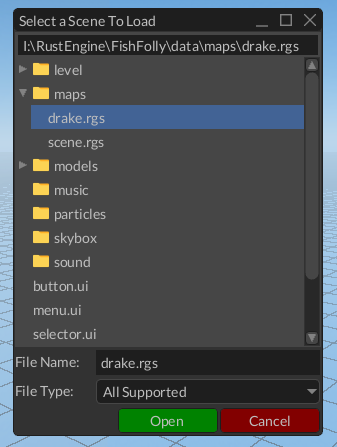
File browser was significantly improved in this release. It now supports file type filtering, much more stable and covered with tests. All of this makes it much more pleasant to work with.
# Asset Browser
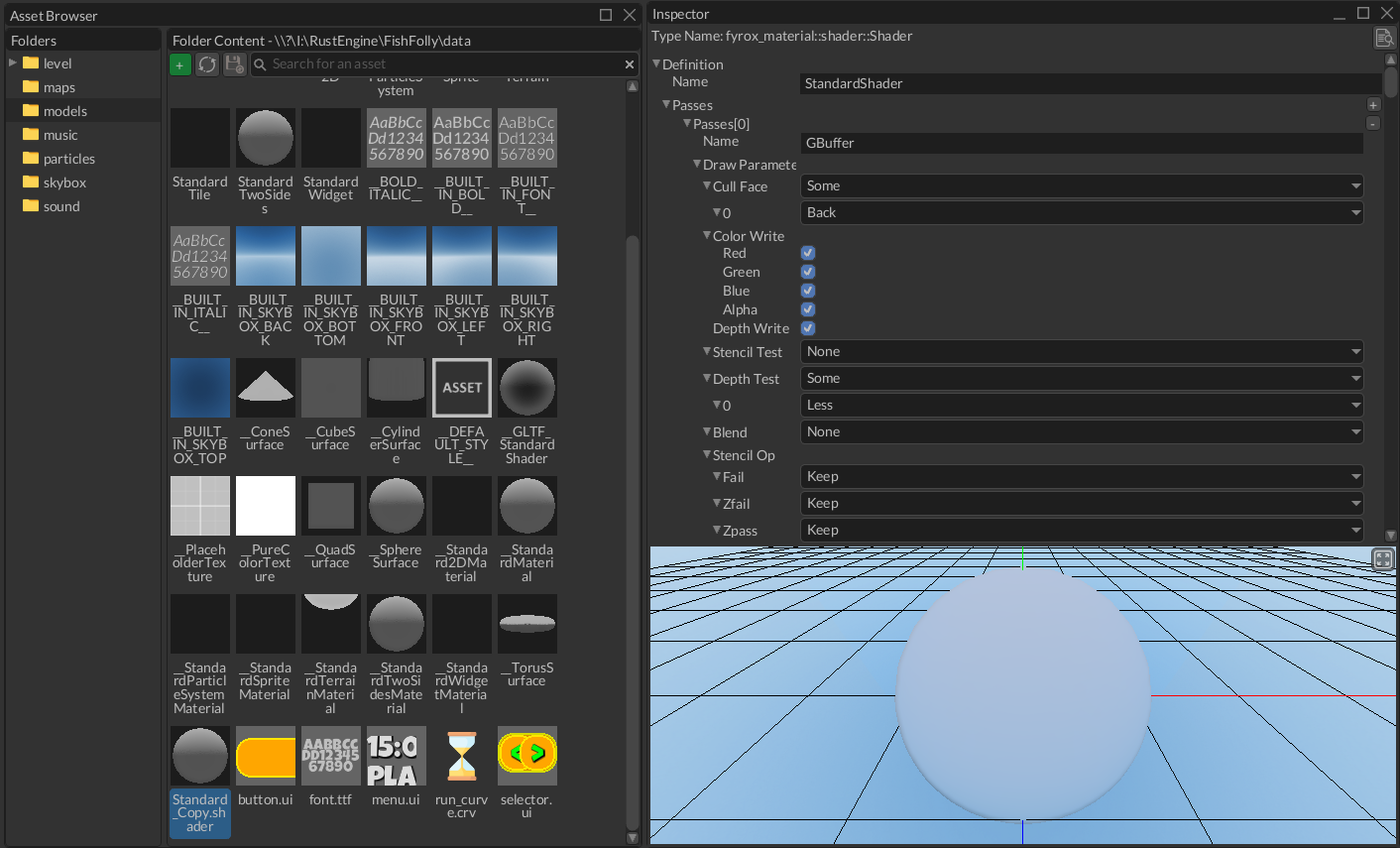
Asset browser in this release has gotten some improvements as well. The most significant one is an ability to preview
and edit shaders. Asset browser now shows the content of the resource registry (typically the data folder), instead of
the project's root.
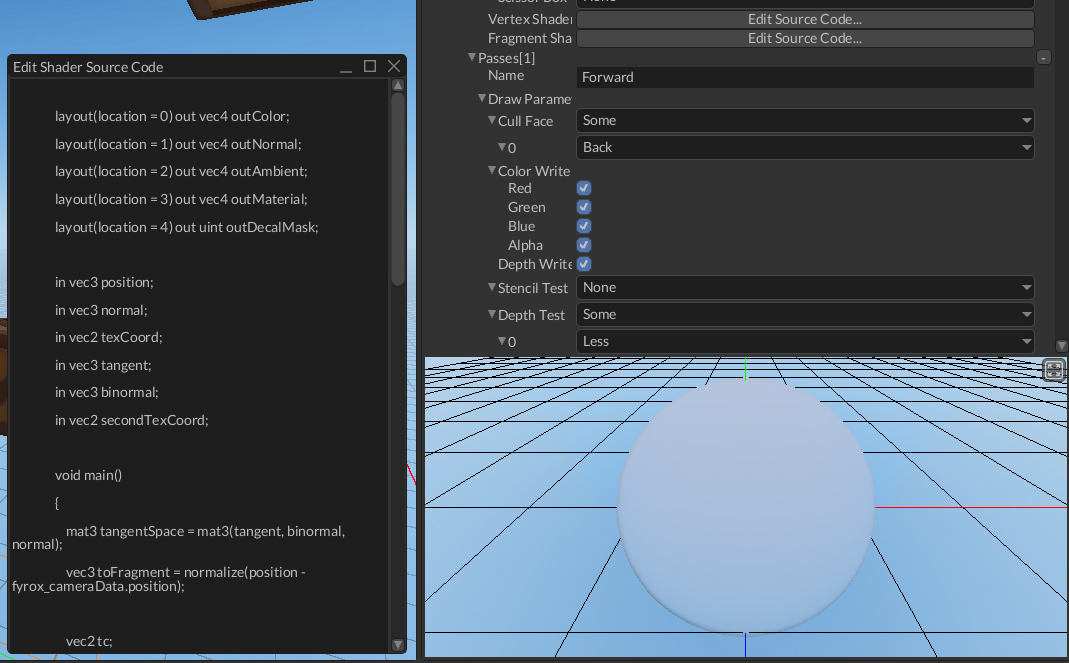
This release also added a very simple shader code editor, nothing fancy, just a simple text box with basic editing. Its main purpose is to be able to tweak shader parameters without a need for external editor. New shaders, however, should still be written in an editor with syntax highlighting and more options.
# What's Next?
The next major goal for the project is to release Fyrox 1.0, which is planned for the 7th birthday of the engine which is 19th of March 2026. The time before the first stable release will be spent on the final stabilization, book and docs improvements.
# Support
If you want to support the development of the project, click this link (opens new window). Also, you can help by fixing one of the "good first issues" (opens new window), adding a desired feature to the engine, or making a contribution to the book (opens new window)
# Full List of Changes
The list is split into four sections for ease of reading and finding particular information.
# Fixed
- Fixed combining lightmaps with emissive channel
- Fixed incorrect light mapping for shared materials
- Fixed incorrect filtering of material when generating a lightmap
- Fixed path filtering in case of empty filter
- Fixed editor hanging when closing a scene tab when more 3+ scenes open
- Fixed incorrect position syncing when modifying z coordinate of 2d body
- Fixed infinite recursion in trait bounds for Visit and Reflect procmacro
- Fixed infinite message loop in node selector
- Fixed crash in node selector when untyped handle was replaced with typed
- Fixed dyn type constructors container type passed on deserialization
- Fixed project template generator
- Fixed crash when trying to rebind a property prefab's animation
- Fixed
Bring into viewfunctionality for log panel - Fixed enabled state for menu items of asset item
- Fixed folder deletion from asset browser
- Fixed crash when attempting to delete ui scene root
- Fixed incorrect "no items" visibility condition + fixed
Make Folder - Fixed incorrect tree root handling when processing fs events
- Fixed file system watcher for file browser widget
- Fixed crash in fs tree creation
- Fixed incorrect nan handling in numeric up down widget
- Fixed infinite message loop in numeric up down
- Fixed incorrect hdr adaptation
- Fixed hdr auto exposure
- Fixed defaults for automatic exposure for hdr
- Fixed incorrect frame luminance calculation for hdr
- Fixed luminance calculation glsl function
- Fixed misleading docs
- Fixed gltf loading
- Fixed panic from
TileColliderload failure - Deduplicate fs events to prevent duplication of fs tree items
- Correctly filter out editor nodes when generating a lightmap
- Update vertex buffer if its layout has changed
- Clip keyboard focus rectangle by widget's clip bounds
# Added
DynTypefor user-defined serializable structures with full editor support- Error handling for scripts and plugins with optional backtrace capture
- UI rendering optimization based on widget invalidation
- BBCode support
- Font fallbacks
- Experimental shader code editor
- Added ability to keep the editor active on every frame
- Added ability to disable bloom + configurable bloom threshold
- Automated testing mode for the editor
- Added hdr settings
- Added named scopes for renderer to improve debugging
- Added background for the editor content
- Added user data for
Graph - Added property editor for
TextureKind - Added
This folder is emptymessage for file browser - Added helper methods to graph to borrow nodes and do ray casting
impl Displayandimpl Errorfor various engine errorsUserInterface::send_to+UserInterface::send_many_to+UserInterface::send_many_to_if+UserInterface::send_sync_manymethodsUiMessage::is_for+UiMessage::data_for+UiMessage::for_widget+UiMessage::data_from+UiMessage::comes_frommethods- UI message delivery mode
- Helper methods for scene nodes:
set_position,set_position_xyz,set_rotation,set_rotation_angles,set_rotation_x,set_rotation_y,set_rotation_z,set_scale,set_scale_xyz,set_uniform_scale - Add useful instructions (opens new window) for contributors
- Configurable exposure for editor's camera
impl Default for DrawingContext- Visual invalidation flag for widgets
- Headless mode for the editor
- Autotesting for the editor
- Resource io improvements
- Folder filter preset for file browser
- Path filtering in file selector
- Add
All Supportedfilter option for file selector - Ability to deselect currently selected path in file browser
- Standard
ok+cancelstyles for button background decorator - Icons for editor's menu items
- Padding for text box and formatted text
- Overall style improvements
- Placeholder for textbox + searchbar widgets
- Add preview for shaders
control_trait_proxy_implsmacro + boilerplate code removalBuildContext::addmethod- Ability to check if a path is a built-in resource path
- Property editor for
TexturePixelKind - Property editors for vec<matrix 2/3/4>
- Type uuid provider impl for matrix 2/3/4
- Property editors for shader entities
- Better error handling for
Pool,Graph NetStream::pop_messagemethod- Arbitrary error support for visitor
- User data for
GraphandUserInterfacebased onDynType - Ability to edit ui scene settings
to_base/to_variantmethods for handle type conversion- Better error handling in
Ragdoll::iterate_recursive HandlesArrayExtensiontraitto_baseforVec<T>where T: ObjectOrVariant- Property editor for
Style Rectangle::apply_animation/Sprite::apply_animationhelper method for easier applying of sprite sheet animation- Shortcuts for setting specific part of the linear velocity of rigid body
PluginContext::load_uihelper method- Ability to fetch scene nodes by uuid
Pool::next_free_handlemethodPlugin::on_game_error- ability to handle game errors and disable standard logging- Ability to add scene nodes at desired handles
Shader::find_texture_resource+Self::find_property_group_resource- Ability to check if shader has a texture/property group resource
impl Display for VertexAttribute- Ability to explicitly specify location of the second tex coord attribute
- Ability to clear lightmap
# Changed
- UI messages refactoring - removed message constructors and replaced with direct enum variant creation.
- Migrated to typed handles
- Fill in the default path to lightmap texture as registry root
- Improved surface data viewer to show vertex layout
- Report non-supported nodes when generating a light map
- Make
instance_id_mapimmutable in the editor - Use
tinyaudioversion 2 - Refactored
TabControlto use only uuids for tabs - Removed lazy_static dependency
- Keep the nodes at their handles when saving a scene in the editor
- Use task pool instead of spawning a thread manually when loading a scene
- Refactor
Styleto use plain sorted vector - Shortcuts for
ScrollViewerMessage+ListViewMessage - Allow fetching base type instances from compound objects
- Support typed handles in multiborrow context
- Allow comparison of base and derived handles
- Return result in behavior trees
- Shared property editors container
- Plugin docs improvements
- Improved
copyfunctionality for log entries - Show/hide apply+revert buttons in inspector correctly
- Wrap shader source code into newtype wrapper
- Make shader entities inspectable
- Keep asset preview enabled when inspecting built-in assets
- Show asset preview for built-in assets
- Show the content of built-in assets in inspector when selected
- Limit dropdown container min width instead of width
- Show registry root when clearing the search bar in the asset browser
- Ability to set text box's padding via respective message
- Do not allow deleting the root registry folder
- Refresh asset browser if a folder was added/removed
- Do not register unsupported paths in
ResourceManager::find - Check if a resource can be loaded before registering it
- Use
WrapPanelin the animation editor for better toolbar layout - Improved menu item with icons + helper for
MenuItemContent - Handle
Rescanmessage correctly - Check if a file already exist when selecting a file in file selector
- Use
ok+cancelbutton style for file selector widget - Take filter into account when checking if a folder is empty
- Disable ability to delete path root item
- Refactored path filter to support fixed set of file types
- Ability to show context menu by a click on file browser
- Ability to specify filter for path field editor
- Make path text non-editable
- Hide home/desktop dir buttons if a root is set for file browser widget
- Improved file selector to have configurable list of file types
- Moved FileSelectorField widget to its own module
- Moved mode out of file browser to file selector widget
- Focus selected path on project import in the project manager
- Use resource registry folder for asset browser and file browser
- Do not generate redundant fs tree items if a root is set
- Replaced
OpenModal/OpenAt/OpenAndAlignwindow messages withOpen - Register missing property editors
- Force save an empty resource registry and create a folder for it
- Post
Popup::Closeonly if the dropdown's popup is open - Send
modifiedflag message as sync in inheritable prop editor Widget::local_to_screen- Keep updating all UIs even if there's no graphics context
- Disable shadow casting for scene gizmo
- Ability to run the editor with graphics debugging turned on
GraphicsServer::begin_scope- Ability to specify debug groups for graphics commands
- Use default exposure for editor camera
- Introducing the null scene
- Color space conversion glsl functions
- Return the number of processed message from ui message queue polling
- Improving how selection changes are handled
- Improving UX of TextBox
- Putting space in FormattedText for tabs.
- Allow indexing
UserInterfacewith derived widget handles - Moved
perform_layoutflag toMessageDatatrait method - Use gltf emission strength parameter correctly
- Register gltf standard shader
- Wake up rigid bodies when changing linear/angular velocity
- Made uv + normals optional when loading gltf
- Merge pull request #858 from b-guild/resource
- Ability to disable writing to stdout for
Log - Correctly kill child processes when starting a new export run
- Updated MSRV
- Ability to disable optimizations when exporting the project
- Show full project path in the project manager to reduce confusion
- Use home dir as default location for new projects
- Adjusted styles for "delete project" message box in the project manager
# Removed
- Removed backward compatibility for assets
- Removed
AbstractSceneGraph+BaseSceneGraph, merged inSceneGraph - Removed unused root dir title
- Removed fs events handling from public file browser message
- Removed optimization for
devprofile - Removed hardcoded values for lightmap generation